
How to Find Social Media Accounts by Email: Quick Methods 2026
 Published:
Last updated:
Published:
Last updated:
Watch how AgentsVerse Cloud enriches business email addresses with professional information including company details, job titles, and LinkedIn profiles.
You can sometimes find a professional or social profile using an email address, but the results depend on whether that email has been published publicly, connected to a discoverable account, or included in a reputable business-data source. For professional searches, LinkedIn and company information are usually more reliable than personal social accounts.
What are you trying to do?
Whether you're enriching existing contacts or looking for your next prospects, choose the workflow that best matches your goal.
Enrich a Contact List
Upload business email addresses and enrich them with professional information, including job titles, company names, company websites, and LinkedIn profiles.
- Business email enrichment
- Professional profile matching
- Company and LinkedIn details
Find Companies Ready for Outreach
Discover recently funded companies and verified decision-makers to build targeted prospect lists for sales, recruiting, and business development.
- Recently funded companies
- Verified decision-makers
- Company and contact enrichment
Manual Ways to Find Social Media Accounts by Email
Manual methods are the simplest way to find social media accounts by email without using paid tools. These methods are free and work well when the email belongs to a professional, founder, recruiter, or creator with a public presence.
However, they require time, patience, and multiple attempts.
1. Search Directly on Social Media Platforms
Most social platforms do not provide a reliable public reverse-email search. Results depend on the platform, the user's privacy settings, contact-discovery settings, and whether the email has been published publicly.
How it works:
- Search for information that has been publicly indexed by search engines.
- If you already know the person, contact synchronization may help discover connected accounts.
- For business email addresses, professional data enrichment tools can often identify company information and LinkedIn profiles.
- Results always depend on public availability and platform privacy settings.
Professional and Public Search Options
- Public search engines: Useful for finding publicly indexed profiles and mentions.
- LinkedIn: Often the most reliable source for professional profiles when information has been made publicly available.
- Business data enrichment tools: Can help identify professional information linked to business email addresses.
- Reverse people-search services: Coverage and accuracy vary depending on the provider and available public data.
Limitations:
- Most social platforms do not offer reliable public reverse-email search.
- Results depend on privacy and contact-discovery settings.
- Only publicly available information can typically be found.
- Private information should not be accessed or inferred.
Searching by email can sometimes uncover publicly available professional or social profiles, but results depend on public availability, platform policies, and user privacy settings. For business email addresses, professional profile enrichment is generally the most reliable approach.
2. Use Google Search to Find Accounts by Email
Google is one of the most powerful manual tools to find accounts by email, especially when the email is publicly mentioned on websites, blogs, or social profiles.
How to search effectively:
Try these search variations-
"email@example.com"
"email@example.com" LinkedIn
"email@example.com" Instagram
"email@example.com" Twitter
"email@example.com" contact
You can also add terms like:
- Founder
- Profile
- CEO
- Developer
Why this works:
Many professionals use their email for:
- LinkedIn profiles
- Company websites
- GitHub
- Personal portfolios
- Startup directories
Google indexes these pages, helping you find social media accounts by email for free.
3. Check Username Patterns Across Platforms
Many users reuse the same usernames across platforms.
Example:
If the email is:
johnsmith@gmail.com
Possible usernames:
johnsmith
john_smith
jsmith
Search these usernames on:
- GitHub
This method works well for researchers, recruiters, and investigators trying to find social media accounts manually by email.
Researching one contact is easy. Building an outbound list is not.
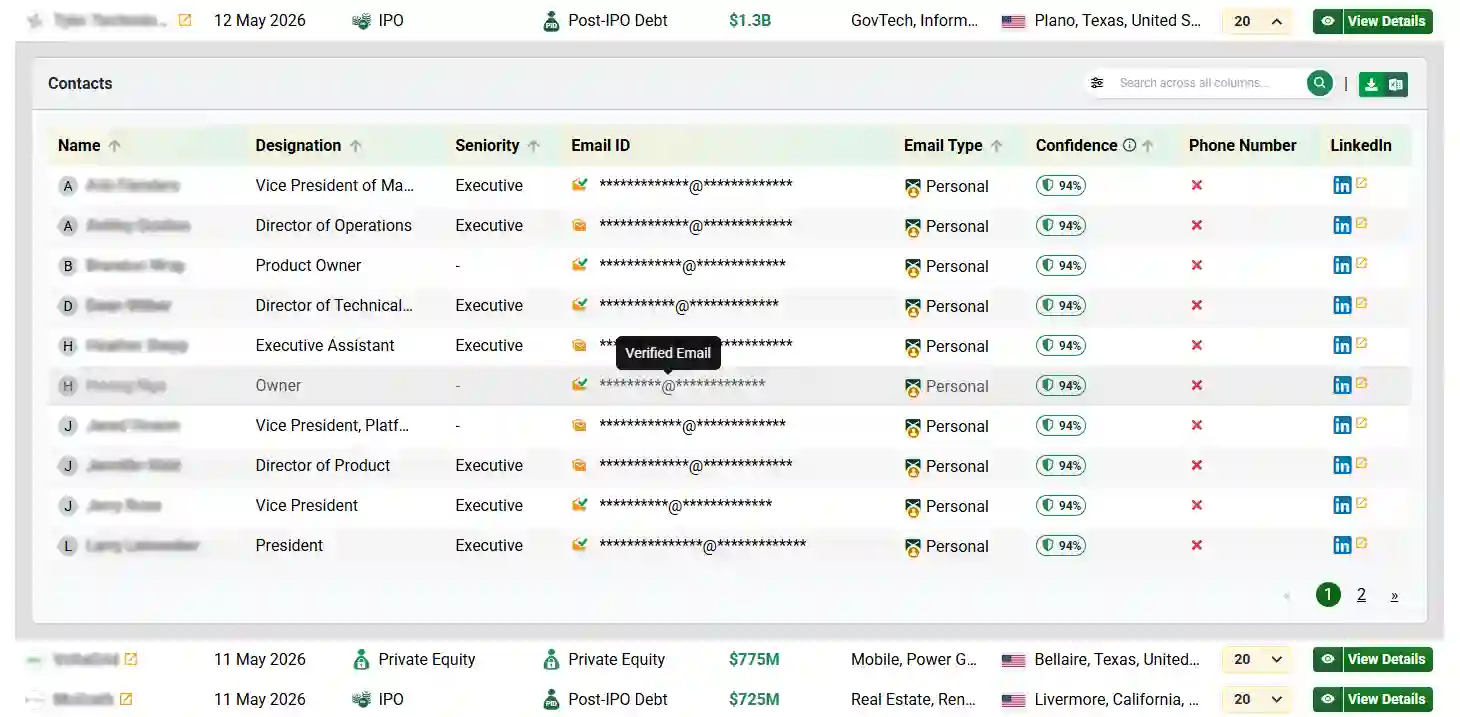
AgentsVerse Cloud identifies newly funded companies and enriches them with verified decision-maker details, including designation, business email, and LinkedIn profile.
Explore AgentsVerse CloudTools to Find Social Media Accounts by Email
Manual methods can help, but tools make it much easier and faster to find social media accounts by email. These tools scan public databases, social networks, and professional platforms to identify profiles linked to an email address.
Some tools offer basic lookup, while others provide deep identity enrichment.
1. Using AgentsVerse Cloud for Business Email Enrichment
AgentsVerse Cloud helps enrich business email addresses with professional information such as job titles, company details, and LinkedIn profiles using public sources, licensed business-data providers, and proprietary enrichment processes.
How AgentsVerse Cloud works
What it accepts
AgentsVerse Cloud accepts business email addresses for individual contacts or contact lists.
- Business email addresses
- Individual contacts
- Bulk contact lists
What it returns
When a match is available, the platform enriches the email with professional business information.
- Full name
- Job title
- Company name
- Company website
- LinkedIn profile
- Location
Privacy & data sources
AgentsVerse Cloud uses public sources, licensed business-data providers, and proprietary enrichment processes. It is designed for professional business information and does not identify private social media accounts or non-public personal data.
Best suited for enriching professional profiles associated with business email addresses.
Best use cases
- B2B sales teams
- Recruiters
- Investors
- Founders
- GTM teams
AgentsVerse Cloud is designed for teams that need to enrich professional business contacts at scale while respecting privacy and relying on business data sources.
Looking for professional contacts for outbound?
Discover recently funded companies and the decision-makers behind them. AgentsVerse Cloud delivers enriched company and contact data directly through the platform, email, Slack, and HubSpot.
Find Recently Funded Companies2. Social Searcher
Social Searcher is a social media search engine that helps users discover profiles linked to emails, usernames, and names.
How it works
It scans public data across:
- Social networks
- User profiles
- Public posts
- Comments and mentions
It then identifies profiles connected to the email or username.
Key features
- Finds public social media profiles.
- Supports multiple platforms.
- Simple and fast search.
- Free search options available.
This tool helps users search social media accounts by email for free using publicly available data.
3. Pipl
Pipl is an identity lookup tool that connects email addresses with real digital identities.
How it works
Pipl scans:
- Public records
- Social media platforms
- Professional networks
- Online directories
It then builds a profile based on the email address.
Key features
- Deep identity resolution.
- Social profile discovery.
- Accurate identity matching.
- Professional profile linking.
Pipl is widely used to find accounts by email for verification and research.
4. Spokeo
Spokeo is a people search platform that connects emails with online identities and social profiles.
How it works
- Social networks
- Public records
- Websites
- Online directories
It links emails to available social profiles.
Key features
- Email-based profile search.
- Social profile identification.
- Easy-to-use interface.
- Free and paid search options.
Spokeo helps users find social media accounts by email quickly.
5. Email Sherlock
Email Sherlock is designed specifically to identify social accounts linked to email addresses.
How it works
It scans multiple platforms and databases to detect accounts associated with the email.
It shows whether the email exists on:
- Social platforms
- Forums
- Online communities
Key features
- Dedicated email lookup tool.
- Fast platform scanning.
- Simple and effective search.
- Platform detection capability.
This makes it easier to find accounts by email without manual searching.
How AgentsVerse Cloud Finds Social Profiles from Email
The truth is, manual research can help you look up social media accounts by email, but it takes time, effort, and sometimes luck. Traditional lookup tools only provide partial results and often miss deeper insights, such as job roles, company details, funding history, and LinkedIn connections.
AgentsVerse Cloud goes a step further. It does not just help you find social media by email. It builds a enriched professional profile around that email.
Here is how it works.
What Makes AgentsVerse Cloud Different
AgentsVerse Cloud uses AI to search public sources, company databases, professional networks, and startup funding trackers to reveal not just social profiles, but real professional identity.
Every valid email can be enriched with:
- LinkedIn profile details
- Company name and domain
- Job title (Founder, CMO, Developer, Recruiter)
- Social media account (LinkedIn)
- Funding history, location, and employee size
- Contact readiness for outreach
- Confidence Score in Percentage (A measure of confidence for accuracy of this information)
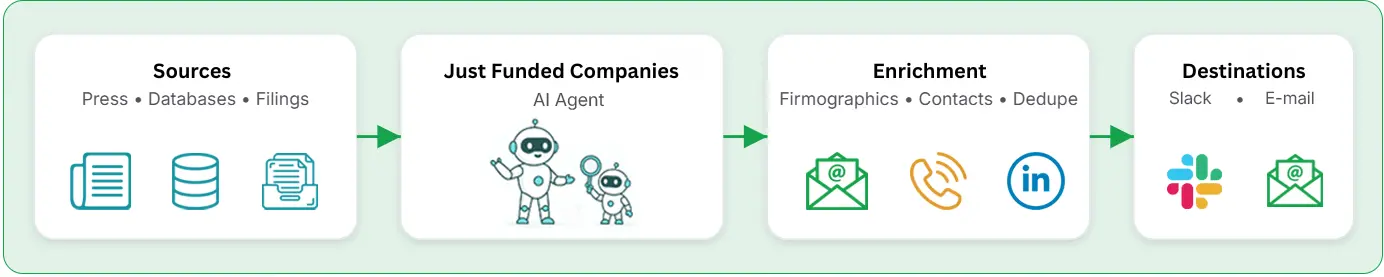
The AgentsVerse Cloud Process: How It Finds Accounts Linked to Email
AgentsVerse Cloud follows a three-step identity enrichment process:
Detect
The AI scans public sources, licensed business-data providers, and proprietary enrichment processes to detect whether the email belongs to an individual or an organization. It identifies company affiliation, public mentions, and domain trust.

Enrich
Once it finds a valid match, it begins enriching the email with verified social media profiles, LinkedIn URLs, company profiles, job roles, and, if applicable, startup funding details.
Deliver
The enriched data is delivered directly to Google Sheets, Slack, email, or your CRM. So you can search for social media accounts by email at scale, without copying and pasting.
While this article focuses on finding professional profiles from email addresses, this demo shows how AgentsVerse Cloud enriches business contacts with LinkedIn profiles, company information, job titles, and other professional data at scale.
Product demonstration showing how AgentsVerse Cloud enriches business email addresses with professional information and delivers business-ready contact data.
Comparison of Methods to Find Profiles from an Email Address
| Method | Best For | Cost | Reliability | Limitation |
|---|---|---|---|---|
| Google Search | Public mentions and indexed profiles | Free | Low - Medium | Only finds information indexed by search engines |
| Username Search | Finding reused usernames across platforms | Free | Low | Can produce false matches |
| Reverse Email Lookup Tools | Public and professional profile discovery | Free / Paid | Varies | Coverage and privacy settings vary by provider |
| Business Email Enrichment | Professional contacts and business email addresses | Paid | Medium - High | Works best with business email addresses |
| Manual Company Research | Professional verification | Free | Medium | Time-consuming for large contact lists |
Move from manual research to signal-based prospecting
Finding information about one person may take a few minutes. Researching hundreds of companies and decision-makers can consume days. AgentsVerse Cloud automates list building and data enrichment for recently funded companies, helping sales and growth teams focus on outreach instead of research.
Find Recently Funded CompaniesConclusion
Email to social media lookup has become a powerful way to verify identities in 2026. While manual methods can help you look up social media accounts by email, they are slow and limited. Smart tools make it easier to search social media accounts by email and find accounts linked to email. Platforms like AgentsVerse Cloud help businesses find social media by email accurately, saving time and improving trust, outreach, and decision-making with reliable data.
FAQs
Are there legal or ethical considerations when using these lookup methods for business outreach?
Yes. It is legal to use publicly available information to look up social media accounts by email, but you must comply with data privacy laws such as GDPR and CCPA. Always use data for legitimate purposes such as verification, research, or business outreach, and avoid sharing or misusing sensitive personal information.
What are the main limitations or accuracy issues with AgentsVerse Cloud and similar tools?
AgentsVerse Cloud relies on publicly available and verified data sources. While it provides highly accurate social, professional, and company-level enrichment, personal accounts with strict privacy settings or non-business emails may not always return complete details. However, it performs significantly better than basic lookup tools.
Is there a cost associated with AgentsVerse Cloud, and how does it compare to other tools?
AgentsVerse Cloud is priced at $49 per month and includes bundled AI Agents for identity research, data enrichment, and monitoring newly funded companies. Unlike enterprise tools like ZoomInfo, it is startup-friendly, requires no complex onboarding, and provides verified decision-maker data without hidden fees.
| Criteria | Manual Prospecting | Apollo / ZoomInfo | AgentsVerse Cloud |
|---|---|---|---|
| Daily automated leads | ✗ Not automated | ✗ Not automated | ✓ ~600 / month |
| Startup‑friendly pricing | ✗ Time cost & tools | ✗ Enterprise pricing | ✓ $49 / month |
| No‑code setup | ✗ Manual workflows | ✗ Complex onboarding | ✓ ~5 minutes |
| Bundled agents (ICP research, enriched data) | ✗ Separate tool | ✗ Separate tool | ✓ Included |
What is a social account search by email address, and how does it work?
A social account search by email address helps identify profiles linked to an email using public data, platform search, and AI enrichment. This email to social media lookup matches emails with verified social accounts and professional details.
Can you find Instagram or LinkedIn profiles using email?
Yes, you can find social media by email, including Instagram or LinkedIn, if the email is publicly linked to a profile. Results depend on privacy settings, platform rules, and whether the account allows email-based discovery
What is the best tool to find accounts linked to email?
The best tool to find accounts linked to email is one that uses AI-based enrichment. Platforms like AgentsVerse Cloud go beyond basic lookup and help search social media accounts by email with verified profiles and company data.
Can you find social media accounts by email?
Yes, you can find social media accounts by email if the address is publicly linked to a profile. Using email to social media lookup tools improves accuracy by verifying accounts linked to email across platforms like LinkedIn and Instagram.